Enterprise AI adoption
A tutor, not a ghostwriter: my AI study workspace at Tsinghua
How I use AI as a study tutor: one rulebook, source citations, separate work folders and a weekly review, with an enterprise GenAI adoption lens.
In this article
Before you read
This post is about using AI to learn, not to produce answers. I don't encourage using AI to write graded homework, exam answers, code for graded projects or a thesis, and nothing here is a shortcut to that. I don't speak for Tsinghua, and this isn't an official view. It's my personal take on a setup that has helped me study faster. Tsinghua's guidelines treat AI as an auxiliary tool and let each course set its own rules, so check your syllabus and ask your instructor before you copy any part of it.
At Tsinghua I don't just study. On top of my master's in Data Science, I take part in several events, and my week has fewer hours than my course list wants.
I already use AI every day. So when the semester started, my question wasn't "should I use AI to study?" It was "how do I use it to learn faster, without it doing the work for me?" All my courses are in English, and so is everything below.
But the first thing I checked was whether AI was even allowed.
Start with the policy, not the tool
When a company rolls out GenAI, the first step isn't picking a model. It's the acceptable-use policy: what the AI may do, what it may not, and who is accountable for the output. I treated my degree the same way.
Tsinghua has university-wide guiding principles for AI in teaching and learning. The short version:
- AI is an auxiliary tool. Students and teachers stay the "primary agents" of learning.
- You can't submit work made by "copying or mechanically paraphrasing AI-generated text, code, or other output".
- In a thesis, using AI for ghostwriting, plagiarism or fabrication is strictly forbidden.
- AI use should be disclosed properly, and each instructor sets the rules for their own course.
- Sensitive or unauthorized material must stay out of AI tools.
So I turned that into one rule for my workspace: AI can explain, quiz and review. It never writes what I hand in. Everything else is built around that rule.
One folder, any agent
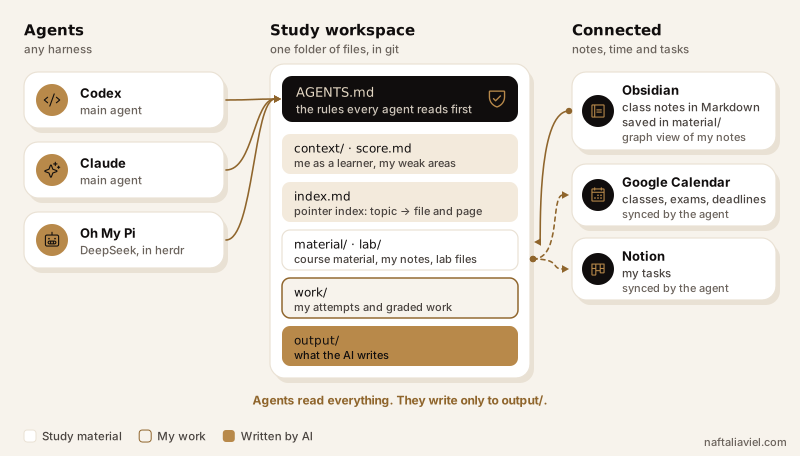
My study workspace is a plain folder of files, versioned in git. Any coding agent can open it. I mainly use Codex and Claude, and when I want a cheaper option I run Oh My Pi with DeepSeek, with herdr as the runtime.
university-things/
├── AGENTS.md            # rules every agent reads first
├── context/             # me as a learner
│   ├── profile.md
│   ├── now.md
│   ├── kpis.md
│   └── score.md         # every score + my weak areas
├── courses/
│   └── course-a/
│       ├── index.md     # pointer index into material and labs
│       ├── material/    # slides, PDFs, my Obsidian notes
│       ├── lab/         # spreadsheets, datasets
│       ├── work/        # my own work
│       └── output/      # what the AI generates
├── skills/              # repeatable procedures
│   ├── course-index/
│   └── weekly-review/
└── weekly-review/       # one review file per week
Before my master's I spent almost three years as a solutions architect, and every part maps to something I'd design in an enterprise GenAI rollout:
AGENTS.mdis the policy. It's the first file every agent reads, so the same rules apply whichever tool I open. One rulebook for every course.context/is the grounding data. Who I am as a learner, what I'm focused on now, my targets, andscore.md, which tracks every score and my weak areas.index.mdis the catalog. My materials are PDFs, handwritten notes, .docx files and my own Markdown notes. Scanning all of them for every question is slow and expensive. So each course has a pointer index. When I ask about Linear Programming, the agent checksindex.mdfirst and opens only the file and page it points to. It's the same reason RAG systems index before they read. Thecourse-indexskill builds it.- Separate folders are the audit trail. Course material and my class notes go in
material/, lab files inlab/. My homework attempts and graded work go inwork/. Generated study material goes inoutput/, so it stays separate from my own work. The template separately permits maintaining the course index, scores and weekly-review files; policy or skill changes are proposed for my approval. skills/holds repeatable procedures, like building the index and running the weekly review, so I don't explain them again every time.- Obsidian is the notebook. I write all my class notes in Obsidian. They're plain Markdown files saved in each course's
material/folder, so every agent can read them without converting anything. And Obsidian's graph view shows how my notes and topics link to each other. - Google Calendar and Notion are the systems of record for time and tasks. The workspace holds what I learn, not what I have to do. Classes, exams and deadlines live in Google Calendar, and my tasks live in Notion. Both are connected to the agent, so when it finds a deadline or a task in my course material, it syncs it there, and I don't copy anything by hand. One system of record for each kind of data, connected instead of copied.
Guardrails: how the agent stays a tutor
The rules live in AGENTS.md. This is the part that matters most, from the template you can download at the end:
## 1. Your role: my private lecturer, never my ghostwriter
- **Homework and projects.** I do my own work and share my attempts for
  feedback. Never write solutions, code, proofs or text meant for submission.
  Point to where an attempt goes wrong, explain the idea with a citation,
  give a hint or a smaller example on a *different* problem, and let me fix it.
  If I ask you to just do it, remind me of this rule and offer the next hint instead.

## 4. Always cite the source
- Every explanation, example or answer names the course material it came from:
  file and page or slide.
- Anything from outside the materials is labelled as general knowledge.
- If you're not sure, say so. Don't guess.
Three guardrails do most of the work.
Hints, not answers. When I'm stuck on homework, the agent explains the material the lecture didn't cover, checks whether my answer is right, and if it isn't, shows me where to improve. I write the answer and I fix it.
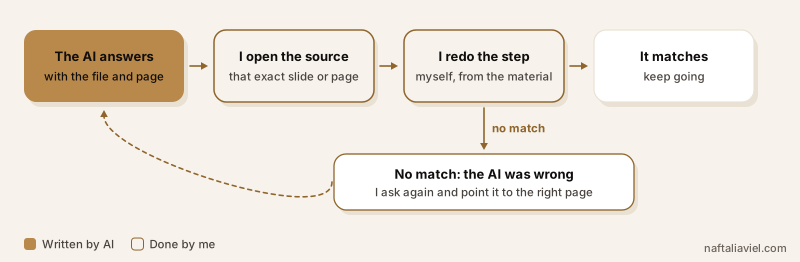
Every answer cites its source. AI gets things wrong. So every time it gives me an answer or an example, I ask which material it came from. Then I open that file, read that page and redo the step myself. If it doesn't match, I know the AI was wrong. In enterprise terms, that's grounded answers plus a human check.
Course material stays where it's allowed. Some of my courses don't allow their materials to be shared, and sending files to an AI tool is sharing them. So those materials never go into the workspace. For those courses, I still ask the AI about the concepts, just without the slides. My main agents run on a paid plan with training on my data turned off. In enterprise terms, that's data classification: decide what may go into the model before anything does.
If a course asks me to disclose how I used AI, I do. I haven't had a course that bans AI completely. If one does, its rule goes into AGENTS.md, and the stricter rule wins.
What I actually use it for
- Lectures. When something wasn't explained well in class, I ask for a different angle: intuition first, then the formal version, then a small example.
- Quizzes and flashcards. Built from my own notes, saved in
output/. - Research papers. Reading and critiquing papers for my thesis.
- Quiz and exam prep. Practice questions in the style of the real exam, aimed at my weak areas, with the answers kept separate so I try first.
- Homework. Explaining material I didn't get and checking my attempts. Never writing the answer.
The weekly review: where it gets better
This is the part I like most. The workspace isn't static. It's designed to adjust and improve, so I do a little better every week, and the weekly review is where that happens.
During the week, whenever a quiz or in-class work comes back to me, I drop it into work/. Then once a week, the agent and I go through it together:
- Collect. The agent reads everything graded that I've added to
work/since the last review. - Score. It fills
score.md: each score with its date, and the topics where I lost marks. - Compare. We look back at earlier weeks: which weak areas are improving, and which aren't.
- Look ahead. It checks Google Calendar for the coming week's quizzes, exams and deadlines, and Notion for open tasks.
- Plan. It writes next week's practice into
output/, aimed at my weak areas and whatever is coming up. - Write it down. A short file in
weekly-review/: what I learned, where I struggled, what's next. - Fix what didn't work. If a rule or a skill got in the way that week, we change
AGENTS.mdor the skill.
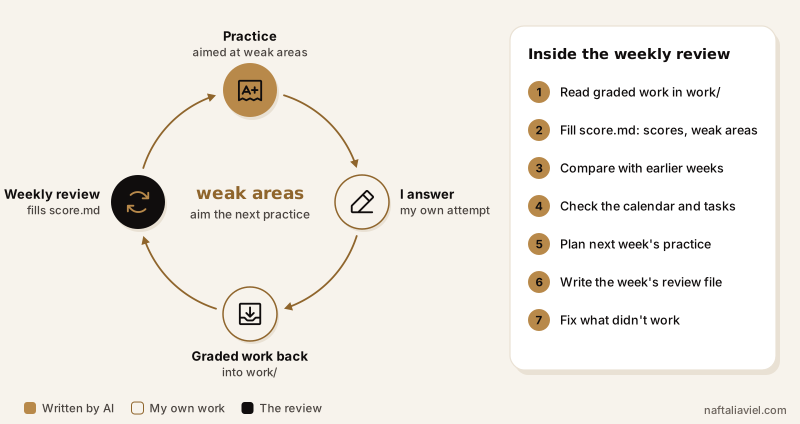
Scores feed weak areas, weak areas feed practice, practice feeds the next scores. For a company, this is the ops review: you measure, you adjust, you run again.
What it doesn't do
It doesn't write my graded homework, exam answers, graded code or thesis text. It doesn't replace lectures either. It fills the gaps between them. And it isn't always right, which is exactly why every answer comes with a source I can check.
Two months in
It's still early, and I don't have clean numbers yet. What I can say is that it has accelerated how I study.
The same pattern works for companies
Look at the setup again: a policy first, grounding data, guardrails, a feedback loop, and a person who owns the output. That's the same pattern I'd recommend to any company rolling out GenAI. The tool is the easy part. The rules around it are what make it safe to use every day.
One thing I tried and dropped: a separate rule file for every course. Keeping all of them up to date was too much work, so I went back to one rulebook. It's the same advice I'd give a company: one central policy you actually maintain beats a dozen local ones nobody updates.
Try it
I've put a template AGENTS.md together from my setup. Treat it as a starting point. Mine is messy, because I edit it almost every day, and that's the point. When the agent does something you didn't want, add a rule. When a rule gets in the way, change it. And check your university's and your course's AI rules before you start.
Use AI to understand the work. Then do the work yourself.